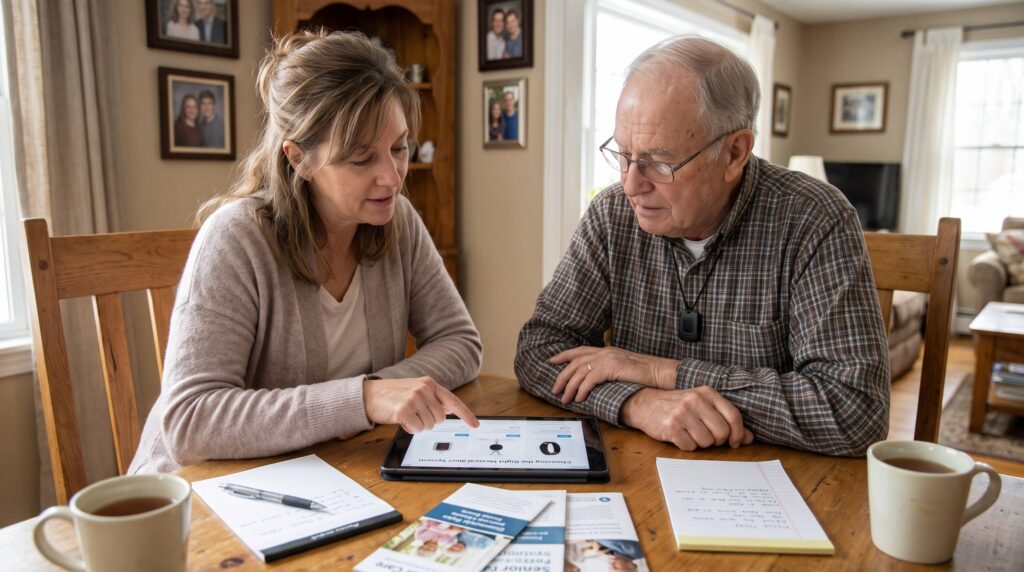
The phone call usually comes on a weekday morning. A daughter, sometimes a son, sometimes a neighbor who has been quietly keeping an eye on things, tells me that Mom was found on the kitchen floor. She is okay, mostly. A bruised hip, a little dehydrated, very embarrassed. Then comes the part that keeps families up at night: nobody knows exactly how long she was down there. That is usually the moment a family starts asking me about medical alert systems.
I have worked as an Aging Life Care Professional for a long time now, and I can tell you that this call is one of the most common reasons families find their way to someone like me. Before we talk about assisted living, home care schedules, or power of attorney paperwork, we almost always end up talking about medical alert systems. It is the first practical step most families take, and honestly, it is the step they most often get wrong.
Not because they buy a bad device. Most medical alert systems on the market today work reasonably well. Families get it wrong because they shop for a gadget when they should be planning for a moment. The moment your parent needs help and cannot get to a phone. Everything about choosing the right system flows from picturing that moment clearly.
So let me walk you through how I approach this with the families I serve.
Why Medical Alert Systems Matter More Than They Look
Falls are not a rare event in later life. According to the Centers for Disease Control and Prevention, falls are the leading cause of injury among adults 65 and older, and more than 14 million older adults, roughly one in four, report a fall each year.
The Danger of the Long Lie
But the fall itself is only part of the danger. What clinicians worry about is the “long lie.” Researchers define it as remaining on the floor or ground for more than an hour after a fall, and the longer someone stays down, the more likely we see complications like pressure injuries, dehydration, muscle breakdown, and a frightening loss of confidence afterward.
One study I return to again and again was published in the BMJ by Jane Fleming and Carol Brayne. They followed people over the age of 90. Among the 60% who fell, 80% could not get up without help after at least one fall, and 30% had stayed on the floor for an hour or longer.
Why Owning Medical Alert Systems Is Not the Same as Using Them
Here is the detail from that study that should change how you shop: nearly 80% of the older adults in that cohort who had an alarm system available did not use it to call for help after a fall.
Read that twice. Most of those people had a button. They just did not press it. Maybe it was on the nightstand. Perhaps they did not want to “bother anyone.” Some hit their head and could not think clearly. Others simply forgot it existed.
That is why I tell families that, among all the medical alert systems out there, the best one is not the one with the longest feature list. It is the one your parent will actually wear, actually understand, and actually use on their worst day.
Choosing Medical Alert Systems Starts With the Person, Not the Product
When I do an initial assessment, I am not thinking about brands at all. I am thinking about the person in front of me. Our professional association describes the work across eight knowledge areas, including health and disability, financial matters, housing, family dynamics, local resources, advocacy, legal issues, and crisis intervention, and comparing medical alert systems touches almost all of them. Here are the questions I work through before I recommend any type of system.
How Does Your Parent Spend a Typical Day?
I mean really spend it, not how you imagine they spend it. Do they garden? Drive to church? Walk the dog around the block at six in the morning? Sit in the same recliner from breakfast until the evening news? A parent who rarely leaves the house has very different needs from one who still runs errands three times a week.
Where Are the Risky Spots?
In my experience, the bathroom is where a lot of the trouble happens. Wet floors, getting in and out of the tub, standing up too quickly from the toilet. The bedroom at night is another. Your parent gets up to use the bathroom, half asleep, maybe a little dizzy from blood pressure medication. If the device is not waterproof and worn in the shower, or if it sits charging on the dresser all night, you have left the two most dangerous rooms in the house uncovered.
How Is Their Thinking?
Cognition matters enormously here. A parent with early memory changes may forget what the button is for, or press it accidentally and then panic when a stranger’s voice comes out of the speaker. A parent with moderate dementia may wander, which shifts the priority toward location tracking. I always ask the family to be honest with me about this, even when it is painful. It is also where health literacy comes in, because a device only helps if your parent understands what it does and when to use it.
How Is Their Hearing?
This one gets overlooked constantly. Most medical alert systems rely on two way voice communication. If your father cannot hear the operator through a small speaker on his wrist, the conversation breaks down at exactly the wrong moment. I have seen families buy a sleek watch style device only to discover their dad could not make out a word the response center said.
How Are Their Hands and Eyes?
Arthritis, neuropathy, tremor, and low vision all affect whether someone can find and press a small button, or manage a touchscreen, or remember to charge a device every night. These are the same barriers to accessible healthcare that show up across nearly every tool older adults are asked to use.
Who Else Is Around?
Does your parent live alone? With a spouse who is also frail? With an adult grandchild who works nights? Are there neighbors who could respond within minutes? This shapes the response plan, which I will come back to.
I write all of this down before we look at a single product page. When families skip this step, they end up with a device that solves somebody else’s problem.
Understanding the Main Types of Medical Alert Systems
Once I understand the person, the options narrow quickly. Broadly speaking, medical alert systems fall into a few categories.
In Home Medical Alert Systems
These pair a base station with a wearable button, usually a pendant or wristband. The base unit has a powerful speaker and microphone, so your parent can talk to the response center from across the room. Older versions needed a landline. Most today run on a cellular connection built into the base. These systems work best for someone who spends nearly all their time at home, especially if hearing is a concern, because the base station speaker is usually much louder and clearer than anything worn on the body. The tradeoff is obvious. Once your parent steps beyond the range of the base, they are unprotected.
Mobile Medical Alert Systems With GPS
These are small, self contained devices worn around the neck, clipped to a belt, or carried in a pocket. They work anywhere there is cellular coverage, and the response center can see roughly where your parent is. For an active parent who still drives, shops, or walks outdoors, this is usually where I land. The catch is charging. Mobile devices need regular recharging, and every night that the device sits on a charger is a night it may not be on your parent’s body.
Smartwatch Style Devices
These look like ordinary watches, which matters more than you might think for people who refuse to wear anything that “looks medical.” Some connect to a professional monitoring center; others only call family or emergency services. The screens can be small, the buttons fiddly, and battery life is often shorter. For tech comfortable parents in their seventies, they can be a great fit. For a 92 year old with arthritis, I usually steer families elsewhere. If you are weighing these against other wearable health devices, compare them on the button and the monitoring service, not the fitness features.
Devices Built Into Things People Already Wear
This category is growing. There is research looking at fall detection inside hearing aids, and one small study found that one hearing aid based fall detection system was more accurate than a standard fall detection pendant, while a second performed about the same. The study was small and used simulated falls in a lab, so I would not oversell it, but for a parent who already wears hearing aids every day and resists a pendant, it is worth asking their audiologist about.
There is no single best category. The right answer is the one that matches how your parent actually lives, and it often works best alongside other assistive technology for seniors already in the home.
The Honest Truth About Fall Detection in Medical Alert Systems
Almost every family asks me about automatic fall detection, and I understand why. If your mother hits her head and loses consciousness, she cannot press a button. Many medical alert systems now offer fall detection, which is supposed to fill that gap by sensing a sudden drop and calling for help on its own.
It is a valuable feature, and for many of my clients I recommend it. But I want you to go in with clear expectations.
It Will Miss Some Falls
No fall detection system catches every fall. Slow slides, like sinking down against a wall or slipping off the edge of a bed, are harder for sensors to recognize than a hard, sudden fall.
Lab Results Are Not Real Life
A lot of the accuracy testing you see in marketing has limitations. Researchers have pointed out that automatic fall detectors have traditionally been tested in lab simulations in which young adults fall onto padded mattresses, which is a very different situation from an 85 year old woman crumpling beside her bathtub. When independent researchers tested a combined smartphone and smartwatch approach, it correctly identified 63% of simulated falls. That study did not involve a dedicated medical alert product, but it shows why I tell families to treat fall detection as a safety net with holes in it, not a guarantee. Newer algorithms, including those built with AI in healthcare, are improving, but the same caution applies.
Expect False Alarms
Sitting down hard in a chair, dropping the pendant on the floor, or a vigorous wave of the arm can sometimes trigger it. Most systems give the wearer a short window to cancel, and a good response center will simply check in. Prepare your parent for this so the first false alarm does not frighten or embarrass them into taking the device off.
My Practical Advice
If your parent has fallen before, takes medications that cause dizziness, has a condition that could cause sudden loss of consciousness, or has significant balance problems, pay for fall detection. Then still teach them to press the button whenever they can. Belt and suspenders.
Who Answers When Medical Alert Systems Are Activated?
This is the question I wish more families asked first. When your parent presses that button at 2:47 in the morning, what actually happens?
Professionally Monitored Medical Alert Systems
With a professionally monitored system, the call goes to a staffed response center. A trained operator speaks to your parent, assesses the situation, and follows a plan you set up in advance. They might call 911, call you, call a neighbor, or simply stay on the line until your parent feels steady. Monitoring adds a monthly fee, but in my opinion it is the right choice for almost anyone who lives alone.
Unmonitored Medical Alert Systems
With an unmonitored system, the device dials a list of family phone numbers or calls 911 directly. It is cheaper, but think hard about it. Will you hear your phone at 2:47 in the morning? Will your brother? If nobody picks up, what happens next? I have reviewed too many situations where the alert technically worked but the chain of humans behind it did not.
When you compare monitored medical alert systems, ask direct questions. Where is the response center located? Is it staffed around the clock by the company itself? What is their typical answer time? Can they communicate with someone who speaks your parent’s primary language, or connect to medical interpreter services? Do operators receive any training in speaking with people who have hearing loss or dementia?
Building the Response Plan
Then build the response plan with as much care as you put into choosing the device. This is where I spend a lot of time with families. Decide who gets called and in what order. Put the people closest in distance at the top, not necessarily the people closest in relationship. A neighbor two doors down who has a key is often more useful in the first fifteen minutes than a devoted son three states away.
And please, solve the door problem. Paramedics who arrive to a locked house face a choice between waiting and breaking in. A lockbox with a code that the response center can share with emergency crews prevents both. It is a small step that I put on nearly every care plan I write.
Finally, share your parent’s medication list, diagnoses, allergies, and physician contacts with the monitoring company. Those details can travel with the alert to the people who arrive.
What Medical Alert Systems Cost, and Who Might Help Pay
Pricing for medical alert systems varies widely depending on features. As a rough guide, one senior living provider notes that monthly costs commonly fall between $20 and $60, with fall detection, GPS, and extra wearables pushing the price toward the higher end. Some companies also charge for equipment upfront or for activation.
Families are often surprised to learn that Original Medicare generally does not cover medical alert systems, though a Medicare Advantage plan might pay for part of the cost, according to Healthline. Coverage under Advantage plans changes from year to year, so call the plan and ask specifically about a “personal emergency response system” benefit.
There are other avenues worth checking. As Humana explains, Medicaid may cover these systems through programs such as Home and Community Based Services, and that coverage varies by state. Programs like PACE, local Area Agencies on Aging, long term care insurance policies, and veterans benefits are all worth a phone call. This is exactly the kind of resource hunting a care manager or patient advocate does every week, so if you have one, ask.
A word on contracts. Avoid long commitments and steep cancellation fees. Your parent’s needs will change. A hospital stay, a move to assisted living, or a decline in health can make the system unnecessary or require a different type. Look for month to month terms, a generous trial period, and a clear return policy for equipment.
Talking With Your Parent About Medical Alert Systems
Here is where I see the most good intentions go sideways. An adult child, scared after a close call, orders a device online, unboxes it at the kitchen table, and announces, “You’re wearing this now.” The parent nods politely. Three weeks later the pendant is in a drawer.
Why Parents Push Back
Older adults resist medical alert systems for real and understandable reasons. They do not want to look frail. Cost worries them. Many believe nothing will ever happen to them. Underneath it all sits the fear that the device is the first step toward being moved out of their home. That last fear matters, because staying home is what most people want. When the National Poll on Healthy Aging surveyed adults ages 50 to 80, as reported by Fortune, 88% said it was important to them to remain in their homes for as long as possible.
That is your opening. In my practice, I reframe the device as a tool for independence rather than a sign of decline. I might say something like, “This is what lets you keep living here on your own terms. It’s the thing that makes the rest of us comfortable saying yes to you staying home.”
Involve Them in the Choice
Show your parent two or three options and let them pick the one they like best. Ownership drives use. Someone who chose the watch is far more likely to wear it than someone who was handed a pendant. That kind of patient engagement is what turns a purchase into a habit.
Let a Neutral Voice Help
Sometimes the same advice lands differently coming from a physician, a care manager, or a trusted friend who already uses one. I have watched a parent dismiss three conversations with her daughter, then agree within five minutes when her own doctor brought it up.
Address the Specific Objection
If appearance is the issue, look at watch styles or discreet clip on options. When cost is the barrier, explore coverage. Pride is the trickiest one, so emphasize that the device is for the family’s peace of mind as much as theirs. “Do it for me” is a surprisingly persuasive request from a worried child.
Be Honest About What It Is Not
It does not mean someone is watching them all day. Most basic systems are silent until pressed or until a fall is detected. Privacy concerns are real, especially with location tracking, and they deserve a straight answer. If your family is considering ongoing health tracking as well, remote patient monitoring is a separate service with its own privacy questions.
Setting Up and Testing Medical Alert Systems
Most medical alert systems arrive ready to use, but do not just plug one in and leave. I build a short follow up routine into every plan.
On setup day, have your parent press the button and talk to the response center. Let them hear the voice, learn what happens, and realize it is a real person who is kind and patient. That one rehearsal removes a huge amount of anxiety.
Walk through the house with the device and test the range, especially the bathroom, the bedroom, the basement stairs, and the yard. Make sure the base station can pick up their voice from the far corners.
Agree on where the device lives at every hour of the day. On the wrist in the shower if it is waterproof. On the body at night. If it needs charging, choose a charging time when your parent is awake, seated, and least at risk, such as during morning coffee or an afternoon television show, rather than overnight.
Then test it monthly. Most response centers welcome test calls. Put it on the calendar and make it routine. Batteries fail, numbers change, neighbors move away, and response plans go stale. A quarterly review of the contact list prevents an alert from going to a phone number that was disconnected last spring.
Watch for signs that the device is not being worn. If the charger is always full and the pendant is always on the counter when you visit, you have a use problem, not an equipment problem. Revisit the conversation without judgment and look for a style your parent will tolerate.
Red Flags When Shopping for Medical Alert Systems
I have seen enough to know what makes me cautious. Be wary of high pressure sales calls, especially ones that open with frightening scenarios and push for an immediate decision. Avoid any company that will not clearly tell you who staffs its response center. Be skeptical of “free device” offers that lock you into multi year contracts. And never let anyone claim their system will prevent falls. Medical alert systems shorten the time to help. They do not stop the fall itself.
Fall prevention is its own work: strength and balance programs, medication reviews, vision checks, home safety changes like grab bars and better lighting, and clearing the trip hazards nobody notices anymore. The CDC’s STEADI initiative, which you can read about on the CDC falls data page, gives clinicians a framework for this. A good alert system belongs inside a broader safety plan, not in place of one.
When Medical Alert Systems Are Not Enough
Sometimes medical alert systems reveal more than they solve. If your parent is pressing the button several times a week, falling repeatedly, unable to recall how the device works, or wandering at night, the system is telling you something important. It may be time for more hands on support at home, a medical evaluation, which can often start with an accessible telehealth visit, or a conversation about a different living arrangement.
That is not a failure. It is information. And it is exactly the point at which an Aging Life Care Professional can help a family step back and look at the whole picture. The Aging Life Care Association describes our role this way: the care professional acts as the coach, while the family or client is the team captain. I have always liked that framing. You know your parent. We know the terrain.
Final Thoughts From Someone Who Has Seen Both Outcomes
I have sat with families after the long lie, and I have sat with families after the button was pressed and help arrived in eleven minutes. The difference in what comes next, physically and emotionally, can be enormous.
So choose with care. Start with who your parent is and how they live. Match the type of system to their days and their risks. Pay for professional monitoring if they live alone. Build a response plan as carefully as you choose the hardware. Have a respectful conversation instead of an ultimatum. Test it, and keep testing it.
Done well, medical alert systems are among the simplest and most humane tools we have for helping an aging parent stay where they most want to be: at home, with their dignity intact.
Frequently Asked Questions About Medical Alert Systems
What is the difference between medical alert systems and personal emergency response systems?
They are the same thing. “Personal emergency response system,” or PERS, is the term insurers and government programs tend to use, while “medical alert system” is the everyday name. NerdWallet’s Medicare guide uses both terms when explaining coverage.
Does Medicare pay for medical alert systems?
Original Medicare generally does not, because these devices are not classified as durable medical equipment. Some Medicare Advantage plans include a benefit, and Medicaid waiver programs may help in certain states. See Healthline and Humana for details.
Are medical alert systems with fall detection worth the extra cost?
For parents who have fallen before, have balance problems, take medications that cause dizziness, or live alone, I usually say yes. Just remember it does not catch every fall, so your parent should still press the button whenever possible. Research on fall detection accuracy is summarized in this PubMed Central study.
Which medical alert systems work best for a parent with dementia?
Usually a simple device with automatic fall detection and GPS location, paired with a professionally monitored response center, since your parent may not remember to press the button or explain what happened. Talk with their physician and consider a care manager’s assessment. The Aging Life Care Association directory can help you find one.
How do I get my parent to actually wear it?
Let them choose the style, frame it as protecting their independence, involve a trusted outside voice, and rehearse a test call together so the system feels familiar rather than frightening. The BMJ study by Fleming and Brayne shows why actual use matters so much.
Can a smartwatch replace dedicated medical alert systems?
For some active, tech comfortable older adults, yes. Parents with arthritis, low vision, hearing loss, or memory changes are usually better served by a dedicated device with a large button and professional monitoring. AARP’s guide to aging in place devices covers the range of options.
How often should medical alert systems be tested?
Once a month at minimum, and review the emergency contact list every few months. Most monitoring centers welcome test calls.
References
- Older Adult Falls Data, Centers for Disease Control and Prevention
- Inability to Get Up After Falling, Subsequent Time on Floor, and Summoning Help: Prospective Cohort Study in People Over 90, The BMJ
- Validation of Accuracy of SVM Based Fall Detection System Using Real World Fall and Non Fall Datasets, PubMed Central
- Preliminary Examination of the Accuracy of a Fall Detection Device Embedded Into Hearing Instruments, Journal of the American Academy of Audiology
- A Combined Smartphone and Smartwatch Fall Detection System, SINTEF
- Does Medicare Cover Life Alert and Other Medical Alert Systems?, Healthline
- Does Medicare Cover Medical Alert Systems?, Humana
- Does Medicare Cover Life Alert?, NerdWallet
- Does Medicare Cover Medical Alert Devices?, Fortune Well
- What Is Aging Life Care?, Aging Life Care Association
- What Is an Aging Life Care Manager?, WRAL
- Choosing the Right Medical Alert System for Your Senior Loved One, Bethesda Health
- Devices to Help You Age in Place, AARP
You may also like
-
What a Patient Advocate Does, When You Need One, and How to Hire the Right One
-
How to Collect and Use Patient Feedback to Improve Care
-
How to Build an ADA-Compliant Website for Your Healthcare Practice
-
Medical Interpreter Services: What Every Hospital Should Know
-
Patient Engagement: 8 Strategies That Improve Outcomes and Build Loyalty